Feature #23: Scale via Nearest-neighbor interpolation
Scale the image (smaller or larger)
Feature description
Scale the image (smaller or larger)
| Parameters | value |
|---|---|
| name | scale_nearest |
| Command | -c scale_nearest X (with X the scale, such as 0.5 or 3) |
| Input | an image |
| output | a new image image_out.bmp scaled by X from the input image |
Usage
./freud.exe -f images/input/image.jpeg -c scale_nearest 3Output
A new image image_out.bmp 3 times larger than the input image
Tips for implementing the feature Do not hesitate to look for resources online to find out how the algorithm works.
For instance (https://towardsdatascience.com/image-processing-image-scaling-algorithms-ae29aaa6b36c): 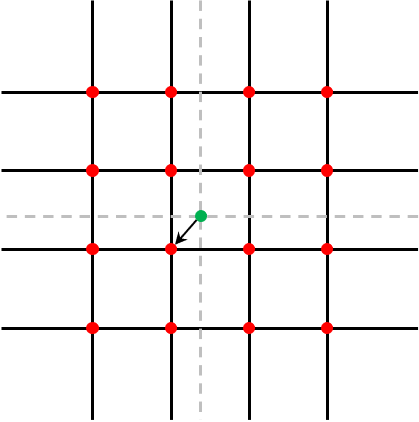
Additional information
Example (scale=0.5):
| Input | Output |
|---|---|
 |
 |